
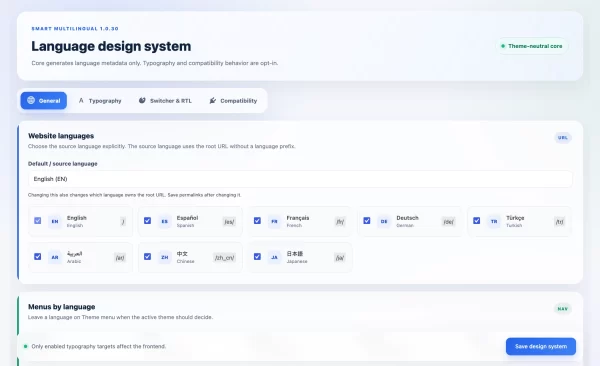
Smart Multilingual – Free WordPress Multilingual Plugin


What is Smart Multilingual?
Smart Multilingual is a free WordPress multilingual plugin designed for website owners and developers who want a simple, flexible way to build multilingual WordPress websites.
Instead of forcing your content into a complex translation dashboard, Smart Multilingual keeps each translation as a normal WordPress page, post, product, taxonomy term or Elementor template.
This gives you full control over content, design, URLs, SEO metadata, menus and media for every language.
The plugin works with Elementor, Elementor Pro Theme Builder, WooCommerce and standard WordPress content. It also includes complete RTL and LTR support, making it suitable for Arabic, Hebrew, English, German, Turkish, Spanish, French and other languages.
Smart Multilingual is especially useful for websites that need multilingual functionality without the complexity of large translation platforms.
Why Choose Smart Multilingual?
Many multilingual WordPress plugins provide powerful features, but their setup can become difficult to manage on smaller or custom websites.
Smart Multilingual takes a different approach.
Each translation remains a real WordPress object that you can edit normally. You can translate your pages with Gutenberg or Elementor, assign a separate menu to each language, create translated WooCommerce products, translate Elementor Pro headers and footers, and control frontend strings without leaving the WordPress workflow you already know.
There is no proprietary translation editor and no external translation service required.
The goal is simple: make WordPress multilingual without making WordPress complicated.
A Simpler Way to Build Multilingual WordPress Websites
Smart Multilingual focuses on clarity and control.
You choose your languages, create a translation, edit it using the normal WordPress or Elementor editor, and publish it.
The plugin handles the relationship between the original content and its translations, language-specific URLs, switcher links, hreflang output and frontend language detection.
This means you can build a multilingual website without learning a separate translation interface.
Language Management
– Add custom languages with language code, locale, native name and URL prefix
– Set any language as the source / default language
– Enable LTR or RTL per language
– Configure hreflang values
– Enable or disable languages independently
Pages, Posts & Custom Post Types
– Translate WordPress pages and posts
– Translate custom post types
– Keep translations connected through translation groups
– Create language-specific slugs automatically
– Edit every translation independently
Elementor
– Translate Elementor pages
– Copy Elementor layouts into new translations
– Preserve widgets, containers and responsive structure
– Keep each translated page fully editable in Elementor
Elementor Pro Theme Builder
– Translate Elementor Pro headers
– Translate Elementor Pro footers
– Automatically load the correct header and footer for each language
– Preserve Theme Builder display conditions
WooCommerce
– Translate WooCommerce products
– Translate product categories and tags
– Translate public taxonomies
– Translate WooCommerce attribute labels
– Filter product archives by active language
Menus
– Assign a different WordPress menu to each language
– Clone menus for another language
– Automatically map translated page links where possible
Language Switcher
– Dropdown layout
– Inline language list
– Native language names
– Short language codes
– Full language names
– Custom CSS classes
– Missing translation behavior controls
Frontend String Translation
– Translate theme strings
– Translate plugin-generated text
– Translate placeholders and HTML attributes
– Translate aria-label values
– Scope translations with CSS selectors
Media Translation
– Language-specific image alt text
– Language-specific image titles
– Language-specific captions
– Language-specific descriptions
Typography
– Per-language typography
– Custom fonts
– Variable font support
– Responsive font sizes
– Font weight, spacing and line-height controls
RTL / LTR
– Language-based RTL and LTR direction
– Arabic and Hebrew friendly
– Elementor RTL layout helper
– Optional row direction reversal
– No language-specific hard coding
SEO & URLs
– Language-aware URLs
– hreflang output
– x-default support
– Dynamic translation slugs
– Language-aware taxonomy routes
Developer Friendly
– Open-source GPL license
– No license key required
– No external translation service
– Standard WordPress data structure
– Shortcodes for language-based output
v1.0.30 — Major Update
– Major multilingual routing improvements
– Dynamic language-based translation slugs
– Improved source and default language handling
– Elementor Pro Theme Builder header translation
– Elementor Pro Theme Builder footer translation
– Improved Elementor translation workflow
– WooCommerce product translation improvements
– Translated taxonomy support
– WooCommerce attribute label translation
– Per-language menu management
– Menu cloning and translation mapping
– Language-aware archives and frontend queries
– Frontend string translation
– Scoped string translation
– HTML attribute translation
– Media metadata translation
– Per-language typography system
– Variable font support
– Revolution Slider language mapping
– Expanded multilingual shortcodes
– Improved language switcher options
– Improved RTL / LTR handling
– hreflang and x-default support
– Multiple routing, compatibility and stability fixes
v1.0.8 — Initial Public Release
– Initial multilingual routing
– Basic custom language management
– RTL / LTR support
– Elementor compatibility
– WooCommerce compatibility
– Frontend language switcher
– Custom post type and taxonomy support
Open Source License
Smart Multilingual is free and open-source software released under the GPL-2.0-or-later license.
You are free to use the plugin on personal and commercial WordPress websites, modify the source code, and redistribute modified versions according to the GPL license.
No license key is required.
Source code:
github.com/codifykithq/smart-multilingual
Be the first to share your experience with this product.
Write a Review
Your feedback helps other customers understand how this product performs in real projects.
Frequently Asked Questions
Yes. Smart Multilingual is completely free and open source under the GPL-2.0-or-later license. No license key or subscription is required.
No. Smart Multilingual is designed for manually managed translations. This gives you complete control over the quality, layout, images, SEO content and design of every language version.
Yes, Smart Multilingual is designed around the normal WordPress workflow. You create a translation and edit it using WordPress or Elementor just like any other page, without learning a separate translation interface.
Yes. You can translate Elementor pages while preserving the original layout, widgets, containers and responsive structure.
Yes. Smart Multilingual supports Elementor Pro Theme Builder headers and footers and automatically loads the correct translated template for the active language.
Yes. Smart Multilingual supports WooCommerce products, product categories, tags, public taxonomies and attribute labels.
Yes. RTL support is configured per language, so Smart Multilingual works with Arabic, Hebrew and other RTL languages while keeping other languages LTR.
Yes. You can define the language code, native name, WordPress locale, URL prefix, text direction and hreflang value for each language.
Yes. You can create and assign separate WordPress navigation menus for every language.
Smart Multilingual provides language-aware URLs, translation relationships, hreflang output and x-default support. SEO titles and descriptions can be managed independently for each translated page using your preferred SEO plugin.
Each translated page is stored as a normal WordPress page or post, so SEO metadata can be managed independently using standard WordPress SEO plugins such as Rank Math or Yoast SEO.
Please report reproducible issues through the Smart Multilingual GitHub repository or comment in review tab in this plugin page.